LumaControl
Modern macOS display control with extended XDR brightness, display-aware sync, and active maintenance for current macOS releases.
Why this exists
LumaControl started as a fork of MonitorControl and became its own project, with a focus on current macOS releases, a native-feeling interface, and display-control ideas upstream had not taken on.
Extended XDR brightness
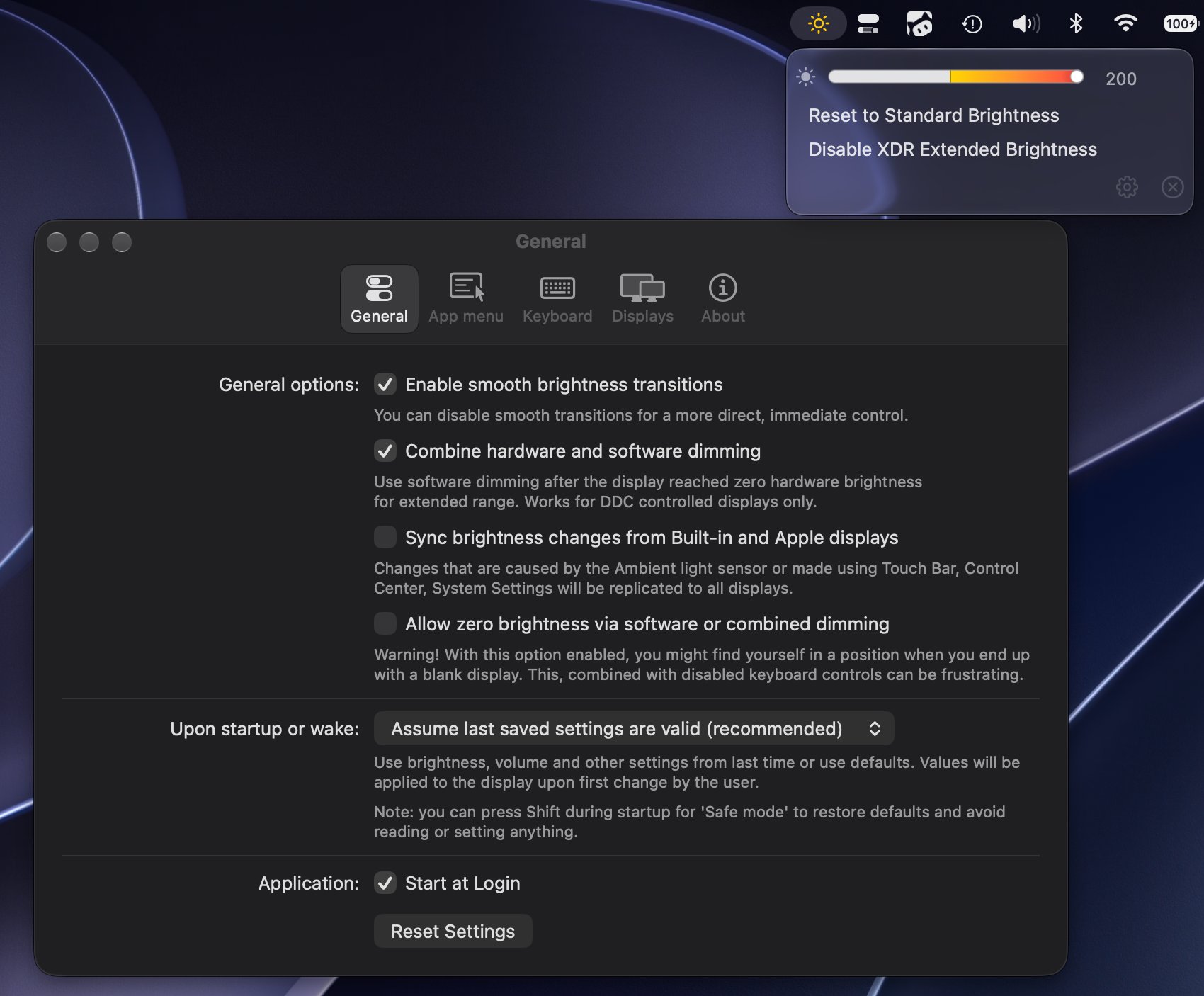
The brightness slider in macOS stops at 100%. On an XDR panel that is a convention, not a ceiling — there is headroom past it. LumaControl exposes that range with the guardrails the feature needs:
- A confirmation step before entering the extended range, so it is never an accidental drag.
- Quick reset and quick disable, reachable without digging through preferences.
- A clear indication you are outside the normal range, because the display will not tell you.
Two kinds of brightness
Worth being precise about, because the difference is real:
| Mode | What happens | Saves power? |
|---|---|---|
| Hardware (DDC / native) | The backlight actually changes | Yes |
| Software (gamma, shade) | The framebuffer is multiplied | No |
Software dimming works on any display, including ones with no DDC support — but the panel still emits at full power. The app offers both and does not pretend they are equivalent.
Maintenance is the project
Display utilities are a commitment, not a weekend build. Every macOS release moves something: private frameworks shift shape, permission requirements change, and the toolchain bumps break working builds. So LumaControl carries CI, unit tests, universal binaries, and its own signed update feed.
The distributed build is ad-hoc signed, which means the first launch is blocked. The documented fix is right-click → Open, or:
xattr -d com.apple.quarantine /Applications/LumaControl.appKeyboard shortcuts may also need Accessibility permission in System Settings → Privacy & Security.




What is LumaControl?
LumaControl is an independently maintained macOS display-control app for brightness, volume, contrast, synchronization, and extended XDR brightness.
It began as a fork of MonitorControl and is being developed as its own project, with a focus on current macOS releases, native-feeling UI, and new display-control ideas.
What this project adds
- Extended XDR brightness beyond the standard 100% range, with confirmation and quick reset/disable controls.
- Display-aware synchronization that respects each display’s available range.
- Modern macOS support with ongoing maintenance for the latest macOS and Xcode releases.
- Universal builds for Apple Silicon and Intel, with CI builds and unit tests.
- Independent signed updates through this project’s Sparkle feed.
Features
- Brightness, volume, and contrast controls from the menu bar or keyboard.
- DDC, native Apple display control, gamma dimming, and shade control.
- Native brightness and volume OSD on supported displays.
- Multiple displays, keyboard shortcuts, smooth transitions, and extensive preferences.
Install
Download the latest universal DMG from Releases, then copy LumaControl to /Applications.
The distributed build is currently ad-hoc signed. If macOS blocks the first launch, right-click the app and choose Open, or run:
xattr -d com.apple.quarantine /Applications/LumaControl.appKeyboard shortcuts may require System Settings → Privacy & Security → Accessibility permission.
Build
Requirements: Xcode, SwiftLint, SwiftFormat, and BartyCrouch.
git clone https://github.com/shay2000/LumaControl.git
cd LumaControl
./build/build.sh
Or open MonitorControl.xcodeproj in Xcode. Dependencies resolve through Swift Package Manager.
Releases
Push a version tag to build and publish a universal DMG:
git tag v0.3.0
git push origin v0.3.0
Build numbers must increase so installed copies can receive Sparkle updates.
Support LumaControl
LumaControl is built and maintained in my spare time, and it will always be free. If it earns a place in your menu bar, you can buy me a coffee:

Credits and license
LumaControl preserves the original MIT license and attribution for MonitorControl contributors. LumaControl changes are maintained by Shay Prasad.
See License.txt for the full license.